Note
Go to the end to download the full example code.
Intro to Grids#
A basic introduction to the GridSpectra class.
import numpy as np
import matplotlib.pyplot as plt

from GridPolator import GridSpectra
Let’s create our own grid#
Let’s think of something that can be created programically but it also simple to visualize. Imagine the class of functions:
There are two parameters, \(a\) and \(b\), and the graph always passes through the origin.
Suppose we want to know the value of this function with \(a ~ [-3,3]\) and \(b ~[-5,5]\). Suppose also that each “spectrum” has some expensive physics in it, so we don’t want to calculate too many, but a high resolution in \(x\) is okay.
Initialize the interpolator#
We now pass all of this information to the GridSpectra class.
Evaluate#
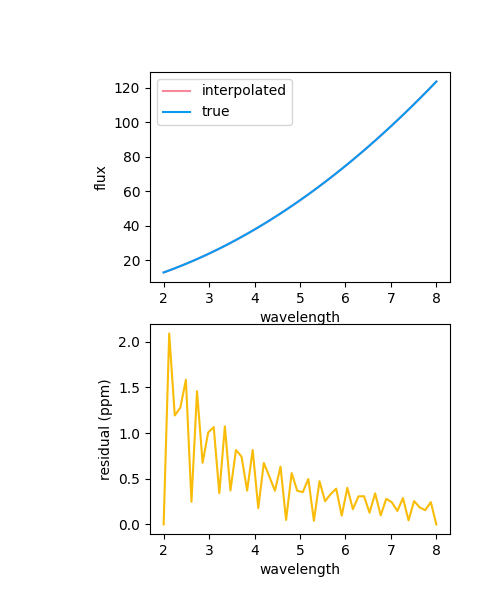
We pass the interpolator a new wavelength grid along with new parameters and it will interpolate to give us a new spectrum.
new_wl = np.linspace(2,8,50)
__a = 1.5
__b = -2.3
new_spec = g.evaluate(
    (
        np.array([__a]),
        np.array([__b])
        ),
    new_wl
)[0]
true_spec = __a * new_wl * (new_wl - __b)

fig,axes = plt.subplots(2,1,figsize=(5,6))
ax = axes[0]
rax = axes[1]
fig.subplots_adjust(left=0.3)
ax.plot(new_wl, new_spec, label='interpolated',c='xkcd:rose pink')
ax.plot(new_wl, true_spec, label='true',c='xkcd:azure')
rax.plot(new_wl, (new_spec - true_spec)/true_spec*1e6, label='difference (ppm)',c='xkcd:golden rod')
ax.set_xlabel('wavelength')
rax.set_xlabel('wavelength')
ax.set_ylabel('flux')
rax.set_ylabel('residual (ppm)')
_=ax.legend()
Total running time of the script: (0 minutes 0.225 seconds)